Instagram direct messages are no longer just casual conversations. For an e-commerce brand, the inbox may contain product questions, delivery requests, creator proposals, refund complaints, wholesale inquiries, and customers who are ready to buy. When a team runs several Instagram accounts, those conversations can become difficult to assign, answer, and hand over without losing context.
The problem is rarely a lack of effort. It is that the work is scattered across shared phones, personal devices, account-switching menus, and informal chat messages between employees. A representative may answer from the wrong brand. A night-shift question may remain invisible to the morning team. A client account may still be logged in on the device of a contractor whose project has ended.
A structured cloud phone workflow gives each Instagram account a stable mobile workspace and gives every conversation a responsible owner. MoreLogin Cloud Phone can run Instagram’s native Android app in separate environments, retain login sessions, and assign those environments to the team members responsible for each inbox.
Why Multiple Instagram Inboxes Become Hard to Control
One inbox can often be handled through memory. Ten inboxes require a system. As account volume grows, the team must know which person is covering each account, which messages need escalation, what was promised to the customer, and when the next shift should follow up.
Several risks appear when that system is missing:
- Messages are answered late because nobody is clearly assigned to the account.
- A reply uses the tone, offer, or shipping policy of another brand.
- Two employees answer the same customer with conflicting information.
- Sensitive payment or personal-data questions remain inside an informal DM thread.
- A staff member copies passwords into team chat to help the next shift log in.
- The business cannot tell whether an unresolved message is waiting for the customer or for an internal decision.
A better workflow separates account access, conversation ownership, escalation, and handoff. Each part needs a clear rule before the team adds more Instagram accounts.
Start With One Persistent Environment per Inbox
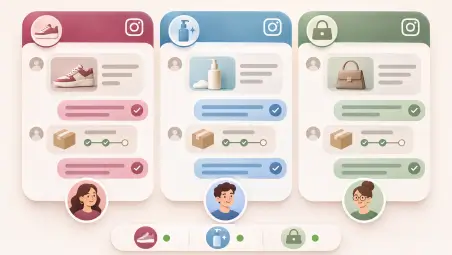
When several accounts share one physical phone, the employee must constantly check which identity is active. A cloud phone changes the operating model: each important account can be placed in a named Android environment with its own Instagram app data, login session, device settings, and proxy configuration.
Name the environment for the work
A useful name combines the brand, market, account purpose, and inbox owner. “Northstar – US – Main Store – Support A” is more actionable than “Instagram 04.” Groups or tags can separate primary support accounts, creator accounts, regional stores, and accounts requiring client review.
Preserve the working session
Persistent login states reduce unnecessary sign-in cycles between shifts. The incoming representative opens the assigned cloud phone rather than rebuilding the account on
another device. Instagram may still request verification under its own security policies, so recovery contacts and authorized verification procedures should remain current.
Keep account access separate from credential access
Managers can assign specific cloud phone environments to team members while restricting passwords, cookies, and other sensitive information. The representative receives the workspace required for the shift without making shared credentials the default collaboration method.
Create a Conversation Queue Before Writing Replies
Fast responses are useful only when they lead the conversation to the right outcome. Teams should classify incoming DMs into a small set of operational queues. A practical e-commerce model includes:
- Pre-sale: product fit, sizing, availability, ingredients, compatibility, pricing, and discount questions.
- Order support: delivery status, address changes, damaged items, returns, or missing packages.
- Creator and affiliate: collaboration requests, sample inquiries, campaign submissions, and partnership terms.
- Commercial: wholesale, retail, press, or business-development opportunities. ● Sensitive: payments, account security, personal information, threats, legal complaints, or high-risk disputes.
Every category should have an owner, a response target, and an escalation path. Routine questions may stay with the community team. Order issues should move to a verified support system. Sensitive cases should be handled by an authorized manager instead of continuing through a general social inbox.
Use MoreLogin to Match Accounts With the Right Operators
A team does not need to give every employee access to every account. An e-commerce company can assign one set of cloud phones to customer support, another to creator relations, and a smaller set to account leads. Temporary employees can receive only the environments needed for a seasonal campaign.
For teams designing this model, MoreLogin for multiple Instagram accounts combines isolated Android environments, team assignments, and automation options in one operating workspace.
Access should follow current responsibility. If a representative changes markets, leaves the company, or finishes a temporary assignment, the manager should update the environment assignment promptly. The account remains in the company workspace rather than on the former employee’s personal phone.
Build Reply Guidance That Still Sounds Human
Templates help teams answer recurring questions accurately, but rigid scripts can make every brand sound identical. A useful response library separates fixed facts from editable conversation language.
Fixed facts include return windows, supported countries, warranty terms, product specifications, and the official channel for sharing order information. These should come from an approved source and be updated whenever the business policy changes.
Editable language includes the greeting, acknowledgement, explanation, and closing. Representatives should adapt those elements to the customer’s question, brand tone, and conversation history. The objective is consistent information, not identical sentences.
MoreLogin’s Synchronizer can help enter different reply text across selected cloud phones and introduce delays between inputs. This is useful for account-specific messages, but the operator should review the account, recipient, and final wording before sending. Complex or emotional conversations require direct human attention.
Design a Shift Handoff That Takes Five Minutes
A shift should not end with “check the inbox.” The outgoing operator should leave a compact record that tells the next person what needs action. For each account, the handoff should capture:
- Messages awaiting a customer response.
- Messages awaiting an internal answer or client approval.
- Urgent complaints, delivery deadlines, or reputation risks.
- Creator or commercial opportunities with a promised follow-up time.
- Customers moved to email, help desk, or another secure support channel.
- Any temporary promotion, product issue, or policy change affecting replies.
The incoming operator opens the same assigned cloud phone environment, reviews the handoff record, and continues from the existing Instagram session. This prevents the next shift from starting with a new login and an empty understanding of the conversation history.
A Holiday Launch Example
Imagine a beauty retailer operating a main brand account, a creator account, and two regional store accounts during a holiday launch. The main account receives product questions, the creator account receives collaboration requests, and the regional accounts receive delivery and availability questions.
The retailer creates four named cloud phone environments and assigns primary and backup operators to each. A shared issue log records stock changes, shipping cutoffs, and approved escalation contacts. The morning shift handles routine pre-sale messages. The evening shift
covers order questions and marks unresolved cases for the next day. Creator proposals are routed to the partnerships lead instead of being answered by general support.
During peak periods, Synchronizer may help operators enter account-specific updates or replies across selected environments. RPA or scheduled automation can support defined
repetitive steps. The company still keeps a person responsible for the final message and avoids using automation for spam, artificial engagement, or misleading responses.
Measure Whether the Inbox System Is Working
Follower growth does not reveal whether customers receive useful support. Teams should monitor operational indicators such as:
- First-response time by account and shift.
- Percentage of messages resolved without escalation.
- Unresolved conversations at the end of each shift.
- Cases answered from the wrong account or with incorrect market information.
- Time required to transfer an inbox to a backup operator.
- Number of employees with access to each cloud phone environment.
These measures reveal whether the team needs clearer ownership, better information, narrower access, or more staffing. Automation should be evaluated by accuracy and resolution quality, not only by the number of actions completed.
Keep Security and Compliance Inside the Conversation Workflow
Instagram DMs are not the right place to collect every type of information. Teams should avoid requesting passwords, full payment details, or unnecessary personal data. When identity verification, refunds, or sensitive order details are involved, the representative should direct the customer to an approved support channel.
Cloud phone separation improves organization but does not guarantee account safety or compliance. Businesses remain responsible for Instagram’s terms, privacy laws, record-retention requirements, consumer-protection rules, and client authorization. Account access should be reviewed regularly, especially after role changes and contractor offboarding.
Turn Multiple Inboxes Into an Accountable Support Operation
Managing Instagram DMs across several accounts becomes easier when each account has a persistent mobile workspace, each inbox has a named owner, and every unresolved conversation has a next action. The team no longer depends on whichever employee happens to hold a shared phone.
MoreLogin Cloud Phone provides the Android environments, session continuity, team assignments, and automation tools that can support this model. Used with clear reply guidance and escalation rules, it helps e-commerce teams operate multiple Instagram inboxes without mixing brands, shifts, or customer commitments.
The technology organizes access; the service process creates trust. Brands need both if they want Instagram conversations to become reliable customer relationships rather than a growing queue of unanswered messages.